

|
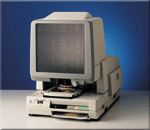
Minolta RP 600Z Reader-Printer |


|
The RP 600Z is Minolta's low-cost reader-printer. Designed primarily for microfiche applications it comes with a built-in fiche carrier for reading all type of fiche and jackets. Compact, quiet and extremely easy-to-use, the RP 600Z is prefect for those users who need to retrieve information of off microfiche. With its standard 12" x 12" view panel, 8 1/2" x 11" prints and the ability to handle both positive and negative film, the RP600Z is ideal for all fiche applications. For those who only need an occasional print, there is also a power-save button that powers down the print engine's fuser unit saving energy during those non-printing periods. The optional 16mm roll film and adapter gives the 600Z the capability to view and print images from 16mm open reel film making the 600Z a low-cost solution for both fiche and 16mm film. The RP600Z is
everything a reader-printer should be. It’s compact, so it can be
placed on a desk or table wherever you need quick access to your
films. It’s quiet more so than any other model in its class so it
can be used in any office environment without bothering those
working nearby. It’s also energy efficient. A
Reader/Reader-Printer switch lets you dramatically cut energy
consumption and your energy bills during those times when you
don’t need to print what you’re viewing. Zoom Lens The RP600Z's 18-36x zoom lens provides maximum magnification ease and versatility while eliminating the need to frequently change lenses. This lens also permits 8-1/2" x 11" (A4) viewing and printing of all common COM formats. A zoom dial ensures quick, smooth zooming for viewing and printing at any desired magnification. Conventional lenses with 18x, 23.5x, 29x, 41x, and 46x magnifications are also available. Easy Operation All controls are neatly arrayed at the front of the unit, near the natural hand position of the operator. Prints are delivered into the front-mounted, built-in print tray just below the control panel. Extra Large, 12" x 12" Screen Compact though it may be, the desktop RP600Z boasts a screen that is just as large as those of conventional floor-standing reader/printers, permitting viewing of entire letter-size (A4) documents at normal magnification. Bi-modal Printing The RP600Z is available in a Bi-mode model that permits printing of positive images from both negative and positive films with a simple change of imaging units. An optional Bi-modal Printing Unit can also be ordered for the Uni-mode model whenever your needs require it. Quick, Crisp Prints Your first letter-size print appears in just 14.5 seconds. Subsequent prints are produced at the rate of 6 prints per minute, or 5 prints per minute for A4-size prints. Up to 9 prints can be printed in a single run. 150-sheet Paper Cassette Conveniently located at the side of the unit for maximum ease of refilling, the paper cassette holds up to 150 sheets of letter-size (A4) plain paper, reducing the need to frequently stop printing in order to refill the cassette. Fiche Carrier The RP600Z's
microfiche carrier permits viewing of microfiche, jackets and
aperture cards; the upper glass opens automatically for insertion of
these microfilms when the carrier is pulled out. The fiche
carrier can be easily moved in any direction to find the desired
frame. Optical Image Rotation With the RP600Z's prism lenses, skewed images can be manually adjusted using the image rotation knob for perfect printing alignment every time. Screen Brightness Control Two brightness settings - Standard and High - allow the user to adjust screen brightness for optimum viewing ease. Contact
Information & Records Associates for more information.
|

|
421 South Eddy
Street ¤ P.O. Box 4578 ¤ South Bend, Indiana email us at: ira@informationandrecords.com |